oaklight/veilrender
Headless browser rendering API — URL to HTML, Markdown and screenshots via Chromium
8.0K
oaklight/veilrender repository overview
VeilRender
中文 | English
Headless browser rendering API with stealth capabilities — self-hostable via Docker or pip.
VeilRender accepts a URL and returns the fully rendered page content (HTML, Markdown, readability-extracted article) using a stealth Chromium browser. Designed as a fallback for fetch tools that fail on JavaScript-rendered or bot-protected pages.
Features
- Stealth rendering — CloakBrowser (71 C++ fingerprint patches) + Patchright (stealth Playwright fork)
- Multiple output formats — raw HTML, Markdown, readability-extracted article text
- Screenshot capture — full-page, viewport, or element; PNG or JPEG with quality/scale control
- Horizontal scaling — gateway + remote browser worker pool with health checks and auto-reconnection
- Mixed browser backends — Chromium (CDP) and Firefox/Camoufox (Playwright protocol) in the same pool
- Prometheus metrics —
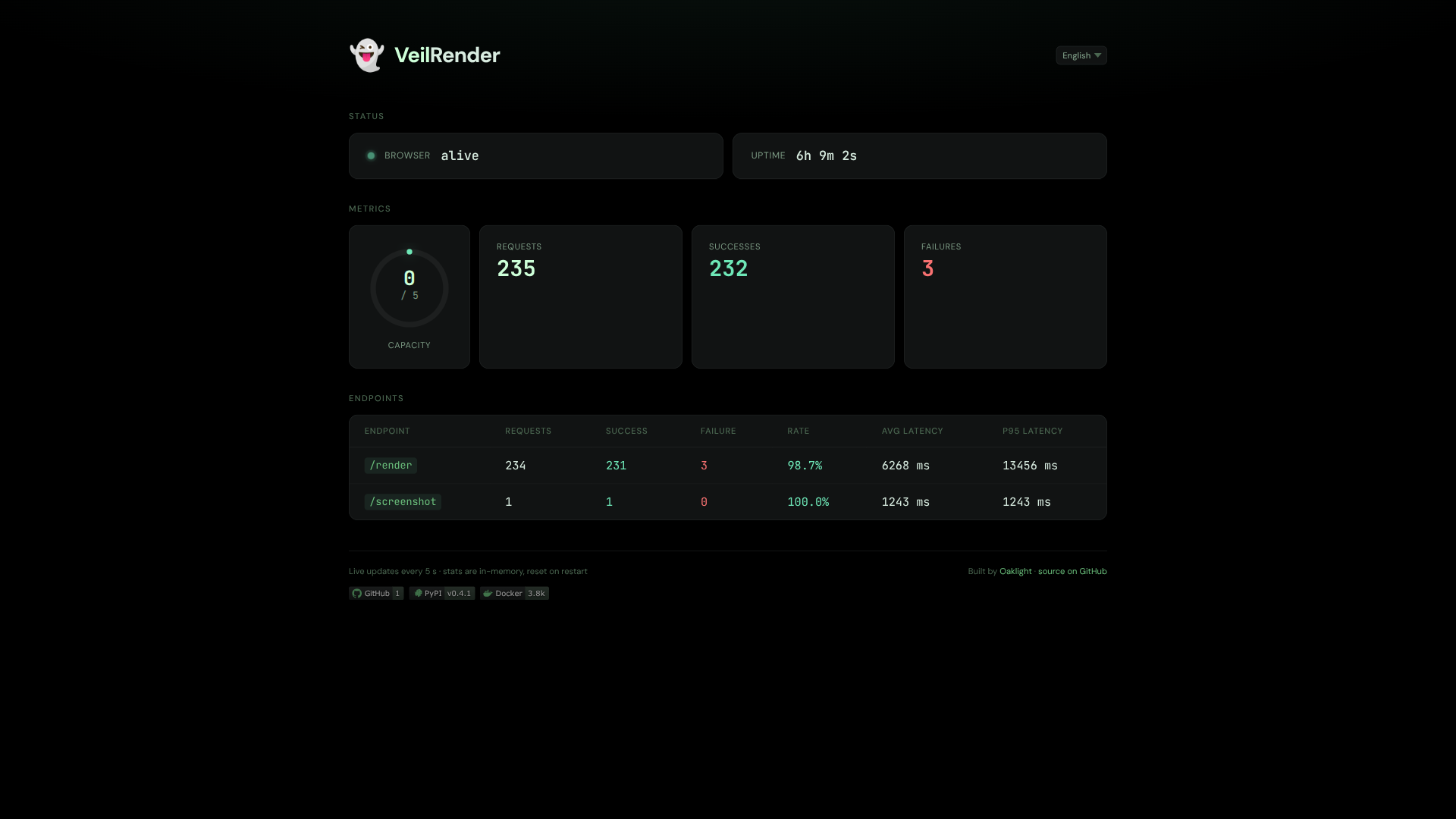
/metricsendpoint with latency percentiles, per-worker gauges - Dashboard — live stats at
/with i18n (en/zh), SVG capacity gauge - Ad/tracker blocking — 82k domain blocklist from StevenBlack/hosts
- Render cache — L1 in-memory + L2 S3-compatible (R2, Oracle, AWS)
- CDP proxy — direct WebSocket access to the browser at
/cdp - Zero external deps (except
patchright) — HTTP server, S3 client, HTML parsing all vendored
Quick Start
Docker (recommended)
# Single instance with embedded CloakBrowser
docker run -p 7860:7860 -e VEILRENDER_API_TOKEN=your-secret oaklight/veilrender:latest

# Gateway only (no browser, 336MB)
docker run -p 7860:7860 oaklight/veilrender:gateway
pip
pip install veilrender
veilrender  # starts on :7860, auto-downloads CloakBrowser binary on first run
Docker Compose — Worker Pool
# docker-compose.yaml
services:
  veilrender:
    image: oaklight/veilrender:gateway
    ports: ["7860:7860"]
    environment:
      - VEILRENDER_WORKERS=cdp://browser-worker:9222
  browser-worker:
    image: cloakhq/cloakbrowser
    command: ["cloakserve"]
See deploy/ for more compose examples including mixed Chromium+Camoufox pools.
API
GET /health
{"status": "ok"}
POST /render
Render a URL and return the page content.
curl -X POST http://localhost:7860/render \
  -H "Authorization: Bearer your-secret" \
  -H "Content-Type: application/json" \
  -d '{"url": "https://example.com", "formats": ["html", "readability", "markdown"]}'
Request body:
| Field | Type | Default | Description |
|---|---|---|---|
url | string | (required) | URL to render |
formats | string[] | ["html"] | Output formats: html, readability, markdown |
wait_until | string | "load" | Playwright wait strategy: load, domcontentloaded, networkidle |
POST /screenshot
Capture a screenshot (PNG or JPEG).
Request body:
| Field | Type | Default | Description |
|---|---|---|---|
url | string | (required) | URL to capture |
format | string | "png" | Image format: png, jpeg |
quality | int | — | JPEG quality 0–100 (only for jpeg) |
full_page | bool | false | Capture the full scrollable page |
scale | float | — | Device pixel ratio (e.g. 2 for retina) |
selector | string | — | CSS selector to screenshot a specific element |
clip | object | — | Region to capture: {"x": N, "y": N, "width": N, "height": N} |
color_scheme | string | — | "light", "dark", or "no-preference" |
wait_for | string | — | CSS selector to wait for before capture |
transparent | bool | false | Transparent background (PNG only) |
wait_until | string | "networkidle" | Playwright wait strategy |
timeout | int | — | Timeout in ms |
viewport_width | int | — | Viewport width in px |
viewport_height | int | — | Viewport height in px |
# Default PNG screenshot
curl -X POST http://localhost:7860/screenshot \
  -H "Authorization: Bearer your-secret" \
  -H "Content-Type: application/json" \
  -d '{"url": "https://example.com"}' -o screenshot.png

# JPEG with quality
curl -X POST http://localhost:7860/screenshot \
  -H "Authorization: Bearer your-secret" \
  -H "Content-Type: application/json" \
  -d '{"url": "https://example.com", "format": "jpeg", "quality": 80}' \
  -o screenshot.jpg

# Element screenshot
curl -X POST http://localhost:7860/screenshot \
  -H "Authorization: Bearer your-secret" \
  -H "Content-Type: application/json" \
  -d '{"url": "https://example.com", "selector": "#main-content"}' \
  -o element.png
GET /metrics
Prometheus exposition format with uptime, request counters, cache stats, latency summaries (p50/p95), and per-worker health gauges.
GET /stats
JSON API for live dashboard data (polled by the dashboard UI).
WS /cdp
Direct CDP WebSocket proxy to the browser. Supports ?worker=N for targeting specific workers in a pool. Disabled by default (VEILRENDER_CDP_ENABLED=true to opt in); raw CDP clients can create contexts outside the egress proxy.
Configuration
All settings via VEILRENDER_* environment variables:
Core
| Variable | Default | Description |
|---|---|---|
VEILRENDER_API_TOKEN | (none) | Bearer token. If unset, auth is disabled |
VEILRENDER_PORT | 7860 | Server port |
VEILRENDER_HOST | 0.0.0.0 | Bind address |
VEILRENDER_TIMEOUT | 30000 | Page load timeout (ms) |
VEILRENDER_VIEWPORT_WIDTH | 1280 | Browser viewport width |
VEILRENDER_VIEWPORT_HEIGHT | 720 | Browser viewport height |
VEILRENDER_MAX_CONCURRENT | 5 | Max concurrent pages (single-instance) |
Worker Pool
| Variable | Default | Description |
|---|---|---|
VEILRENDER_WORKERS | (none) | Comma-separated worker endpoints (enables pool mode) |
VEILRENDER_WORKER_MAX_CONCURRENT | 5 | Per-worker page concurrency |
VEILRENDER_WORKER_HEALTH_INTERVAL | 10 | Health check interval (seconds) |
VEILRENDER_EGRESS_BIND | 127.0.0.1 | Egress proxy bind address (0.0.0.0 in pool mode) |
VEILRENDER_EGRESS_PORT | 0 | Egress proxy port (0 = ephemeral; set a fixed port for pool mode) |
VEILRENDER_EGRESS_ADVERTISE | (none) | Proxy URL given to browsers (e.g. http://gateway:7870) |
VEILRENDER_EGRESS_PROXY_TOKEN | (none) | Proxy Basic-auth password; required for non-loopback binds |
VEILRENDER_UPSTREAM_PROXY | (none) | Optional upstream proxy (http, https, socks5) |
VEILRENDER_UPSTREAM_PIN_IP | true | Send the validated IP to the upstream proxy instead of the hostname |
VEILRENDER_CDP_ENABLED | false | Enable the raw /cdp endpoint (can bypass the proxy — trusted operators only) |
Worker endpoint formats:
cdp://host:9222orhttp://host:9222— Chromium CDP workerplaywright://host:1234/ws-path— Firefox/Camoufox Playwright workerplaywrights://host:1234/ws-path— TLS Playwright worker
Outbound request policy: all HTTP(S)/WebSocket traffic from every browser is routed through an in-process egress proxy that refuses destinations outside the global address space, including each redirect hop. It listens on loopback by default and needs no configuration for single-instance deployments. Pool deployments must expose it to the worker containers (see the pool examples below). A worker whose traffic does not reach the proxy is disabled at startup. The raw
/cdpendpoint is off by default (VEILRENDER_CDP_ENABLED=trueto opt in). WebRTC/QUIC UDP is not proxied; see SECURITY.md for the browser flags remote workers need. If pool-mode navigations fail with proxy or tunnel errors, check thatVEILRENDER_EGRESS_ADVERTISEis reachable from the worker containers and thatVEILRENDER_EGRESS_PROXY_TOKENmatches.
Browser Binary
| Variable | Default | Description |
|---|---|---|
CLOAKBROWSER_BINARY | (auto) | Path to custom browser binary |
CLOAKBROWSER_MIRROR | (none) | GitHub mirror URL for China (e.g. https://ghfast.top) |
Binary detection cascade: env var → ~/.cloakbrowser/*/chrome → auto-download from GitHub Releases.
Cache & Storage
| Variable | Default | Description |
|---|---|---|
VEILRENDER_CACHE_ENABLED | false | Enable render caching |
VEILRENDER_CACHE_TTL | 86400 | Cache TTL in seconds |
VEILRENDER_RESOURCE_FILTER | true | Block ads/trackers during rendering |
VEILRENDER_S3_ENDPOINT | (none) | S3 endpoint for L2 cache |
VEILRENDER_S3_ACCESS_KEY | (none) | S3 access key |
VEILRENDER_S3_SECRET_KEY | (none) | S3 secret key |
Deployment Modes
Single Instance (full image, 1.07GB)
Embedded CloakBrowser — simplest setup, no external dependencies.
docker run -p 7860:7860 -e VEILRENDER_API_TOKEN=secret oaklight/veilrender:latest
Gateway + Worker Pool (gateway image, 336MB)
Browser containers scale independently. Gateway routes via least-connections.
services:
  veilrender:
    image: oaklight/veilrender:gateway
    environment:
      - VEILRENDER_WORKERS=cdp://worker1:9222,cdp://worker2:9222
      - VEILRENDER_EGRESS_BIND=0.0.0.0
      - VEILRENDER_EGRESS_PORT=7870
      - VEILRENDER_EGRESS_ADVERTISE=http://veilrender:7870
      - VEILRENDER_EGRESS_PROXY_TOKEN=${VEILRENDER_EGRESS_PROXY_TOKEN:?set a random token}

  worker1:
    image: cloakhq/cloakbrowser
    command: ["cloakserve"]

  worker2:
    image: cloakhq/cloakbrowser
    command: ["cloakserve"]
Mixed Pool (Chromium + Camoufox)
Dual-engine stealth: CloakBrowser for Chromium-fingerprinted sites, Camoufox for Firefox-fingerprinted sites.
services:
  veilrender:
    image: oaklight/veilrender:gateway
    environment:
      - VEILRENDER_WORKERS=cdp://chromium:9222,playwright://camoufox:1234/ws
      - VEILRENDER_EGRESS_BIND=0.0.0.0
      - VEILRENDER_EGRESS_PORT=7870
      - VEILRENDER_EGRESS_ADVERTISE=http://veilrender:7870
      - VEILRENDER_EGRESS_PROXY_TOKEN=${VEILRENDER_EGRESS_PROXY_TOKEN:?set a random token}

  chromium:
    image: cloakhq/cloakbrowser
    command: ["cloakserve"]

  camoufox:
    build: deploy/Dockerfile.camoufox
Local Browser Gateway (use your own cookies)
Connect the gateway to your desktop browser to render authenticated pages using your existing login sessions. Start Chromium with CDP enabled:
chromium --remote-debugging-port=9333
Then run the gateway container:
docker run --rm --network host \
  -e VEILRENDER_PORT=7880 \
  -e VEILRENDER_WORKERS=http://127.0.0.1:9333 \
  oaklight/veilrender:gateway
Now POST /render to localhost:7880 renders pages as your logged-in browser
would — including sites behind authentication, Cloudflare challenges, etc.
Tip: Create a desktop shortcut for CDP-enabled Chromium so you can launch it from your application menu when needed. See AGENTS.md for details.
Note: Only Chromium-based browsers support CDP. Firefox/Waterfox cannot be used this way (they lack the Juggler protocol that Playwright requires). For Firefox-based stealth rendering, use Camoufox workers.
Docker Images
| Tag | Size | Content |
|---|---|---|
latest / 0.4.0 | 1.07GB | Full — Patchright + CloakBrowser |
gateway | 336MB | Gateway only — no browser binary |
Build locally:
make build          # full image
make build-gateway  # gateway image
Development
# Setup
pip install -e ".[dev]"

# Run locally
make dev            # starts on :7860

# Lint & type check
make lint           # ruff check --fix && ruff format
make typecheck      # ty check

# Dev deploy
make deploy-dev SSH_TARGET=oaklight.buttercup
Community
Feel free to discuss the project via GitHub Issues or the LINUX DO community.
License
MIT
Tag summary
Content type
Image
Digest
sha256:7cc5622d0…
Size
407.3 MB
Last updated
26 days ago
docker pull oaklight/veilrender